Add item
To add a food item click the Add item button which you'll find at the top of the window in the icicles bar; this will result in an Add Item dialog box.

You may notice that this form has:
- A calendar which will have the date, high-lighted in grey, on which you are adding the item; this defaults to "today's" date i.e. the date when you add the item to your freezer book.
If you forget to add the item to the freezer book at the time you store it in the freezer and you update the freezer book some days later then you can change this date to suit (if you can remember when it was).
- A box for you to fill in with a description of the food that you are adding.
- A box for you to register the type of the food item that you are adding.
- Check boxes to indicate the drawer in which you put the new item. If your freezer is a chest freezer this form will say "Basket" instead of "Drawer".
- Two buttons: an OK and a Cancel button.
When you are composing the description of the food item there are some "helpers" which the application offers. They are:
- Each word is capitalised unless Capitalisation is turned off.
- In any case words like "and", "the", etc. will not be capitalised
- Any "word" which contains numbers will not be capitalised.
- Each time you add a new food to a freezer inventory this description will be remembered so that, in the future, if you start to add the same item you will have the full description suggested to you.
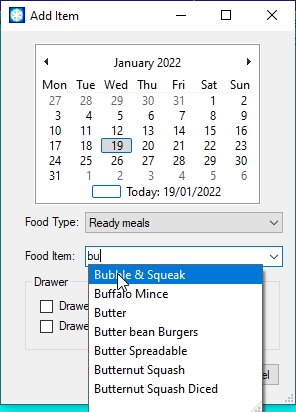
just click on the appropriate suggestion and it will appear in the description box or, if you don't like the suggestions, you are free to type whatever you wish.
- When you have typed in the new food item's description or clicked on a suggestion you will see that the Food type box will have been filled in with something. There is a "not very bright" AIsystem in the freezer book application which tries to predict the food type from your description. If it gets it wrong simply click on the Food type box to get a list of the food types and choose the most appropriate one from the list.
If you have a new food item for which the freezer book does not know the food type then when you have selected the type from the Food type box the new food item and its associated type will be remembered for future reference. If the new food item's description involves more than one word then you will be given the oportunity to choose which is the important word.
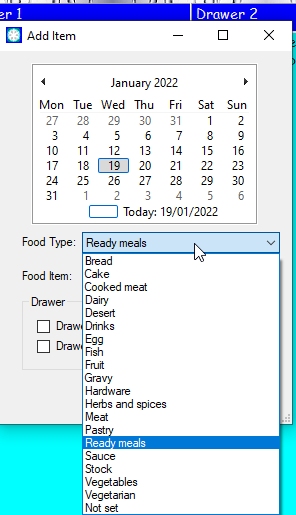
- Lastly click the check box of the appropriate drawer (or basket) and click Ok
Click here to return to where you were.
Note. Where ever you see this symbolhover you mouse pointer over it to get more information.